
Page
last updated on 14-DEC-2025 at 05:59 PM IST
This
page outlines the best practices for operating Grandstream Wi-Fi IP Phones, prepared after years
of practical experience/यह पृष्ठ Grandstream Wi-Fi
IP
Phone के संचालन हेतु सर्वोत्तम
प्रक्रियाएँ प्रस्तुत करता है, जिन्हें वर्षों के व्यावहारिक अनुभव के आधार
पर तैयार किया गया है.
Click ↴
 Recommended →
Connecting with Mobile Hotspot & Caution
Recommended →
Connecting with Mobile Hotspot & Caution
Connecting with
Public/Home Wi-Fi & Caution
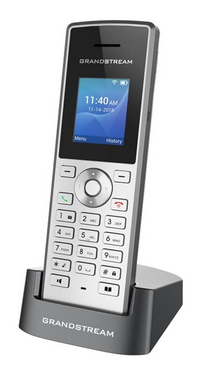
1. A Mobile Hotspot is recommended
for Wi-Fi for this reason ← Click to see].
However, the following cautions should be observed:
1.1. Everyday, restart the mobile Hotspot aswell as the Wi-Fi IP phone for this reason ← Click to see].
1.2. Ensure your mobile network mode is 4G/LTE, not 5G for this reason ← Click to see].
1.3.
Wi-Fi
Band Configuration at Wi-Fi
IP Phone handset
Navigate to:
Menu → Settings → Network → Wi-Fi Band
Select 2.4 GHz instead of 5 GHz for this reason ← Click to see].
2.
Caution: Latest
model of Smart Mobile Phones have bug in Mobile Hotspot, hence Mi-Fi device ← Click to see] should be used for this reason ← Click to see].
3.
We
do not recommend using a Public or Home
Wi-Fi network for Grandstream Wi-Fi
IP Phones because ← Click to see].
If a Public or Home Wi-Fi must still be used for
operating the Grandstream Wi-Fi IP Phone, the
following precautions are mandatory
to minimise disconnection and voice-quality issues:
3.1.
Restart both the Wi-Fi router (or home broadband) and the Wi-Fi IP phone every day for this reason ← Click to see].
3.2.
Wi-Fi
Band Configuration at Wi-Fi
IP Phone handset
Navigate to:
Menu → Settings → Network → Wi-Fi Band
Select
2.4 GHz instead of 5 GHz for this reason ← Click to see].
End